
Foundry has released SmartRoto, a new AI-powered plugin for Nuke, NukeX, Nuke Studio and Nuke Indie that aims to take the grind out of one of the most tedious jobs in visual effects: rotoscoping. We spoke to Adam Cherbetji, Foundry’s Director of Product for AI Research, ahead of the launch.
The first thing to understand about SmartRoto is what it is not. It is not a magic bullet, and it is not another automated matting tool that draws a spline around a segmentation mask. “This isn’t the magic bullet, it doesn’t do the full spline creation for you, it’s about accelerating the keyframing process,” Cherbetji told us. “There is so much artist intuition that goes into the breakdown of the subject into the smaller shapes. And whilst that is somewhat time-consuming, – the really time-consuming part is then the keyframing, …so that’s where we focused.”
In other words, the artist still does what good roto artists have always done: break the subject down into sensible, articulated shapes on a frame where everything is clearly visible. SmartRoto then takes over the part of the job nobody enjoys, moving, animating and deforming those splines across the image sequence to follow the subject.
SmartRoto annual subscriptions are priced at US$499/year, with node-locked and floating licenses available.
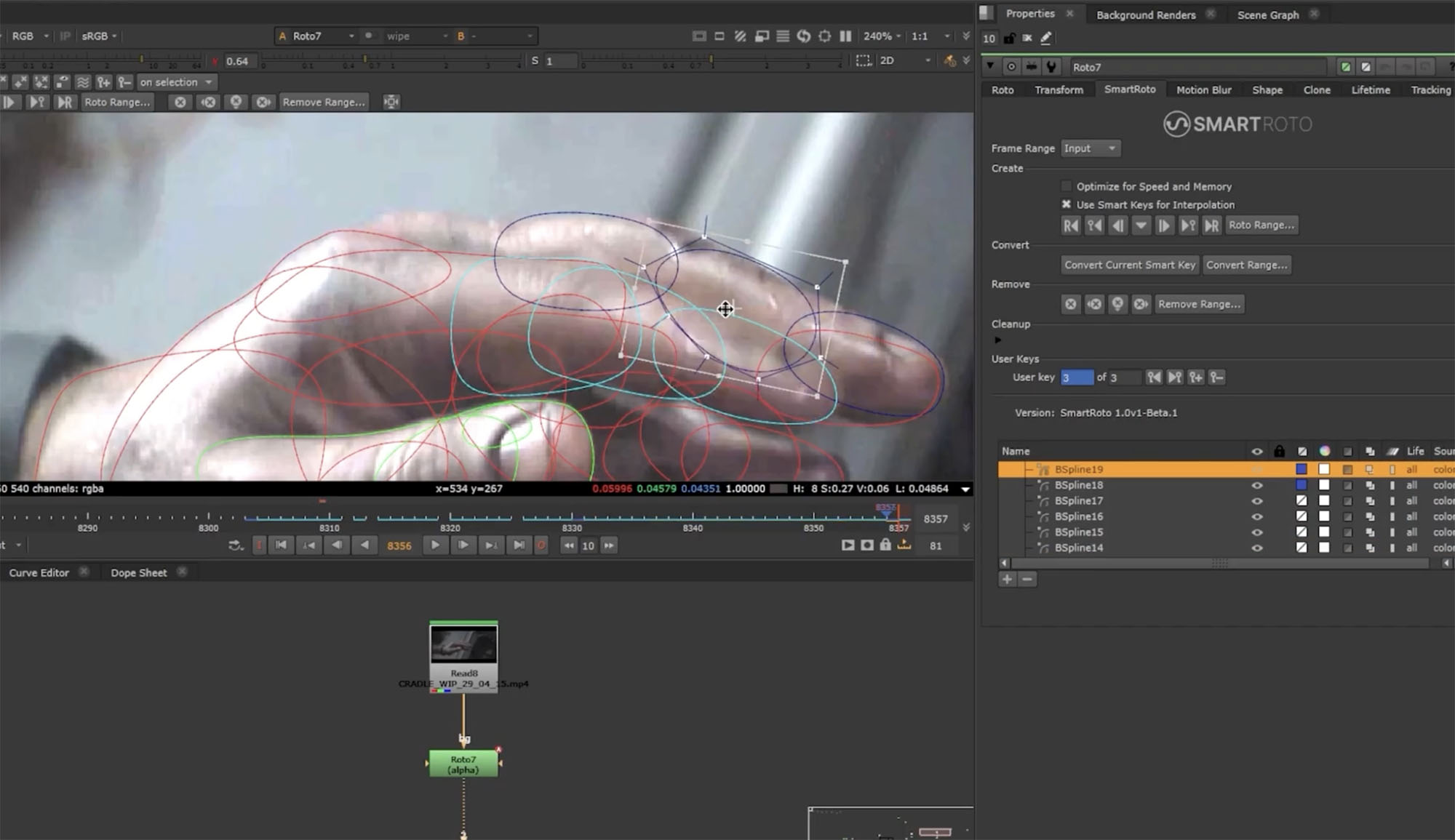
Smart keys and user keys
The workflow is built around a distinction between two kinds of keyframes. Keys the model predicts are called ‘smart keys’. Keys the artist places or corrects are user keys, and these are treated as gospel. “If you’ve positioned it there, we take it as gospel that we’re not going to change it,” Cherbetji explained.
In practice, you create your shapes on a clean frame, then key another significant frame, much as you would working manually. Then hit a key and SmartRoto snaps your roto shapes into place. If the prediction is slightly off, you adjust it, which promotes that frame to a new locked user key. Then you run the model again and it fills in the gaps, either across the whole sequence or just a subsection you are working through.
Critically, corrections feed back into the system. If the middle of an arc is a bit off, you fix that frame, it becomes a user key, and re-running the model takes your updated information into account across the surrounding range. You are giving the model direction, not fighting it. There is no scenario, therefore, where you are presented with a result so wrong you have to start over; the fix is always just an adjustment, never a full redo.
The model does produce a dense set of keyframes, which traditionally would be undesirable since dense keys are painful to manipulate. But because only user keys ever need your attention, the density does not get in your way. The Foundry has included a thinning tool that analyses the motion between keys and looks for ranges that can be represented with interpolation. Cherbetji was candid that this is an area the team wants to keep developing.
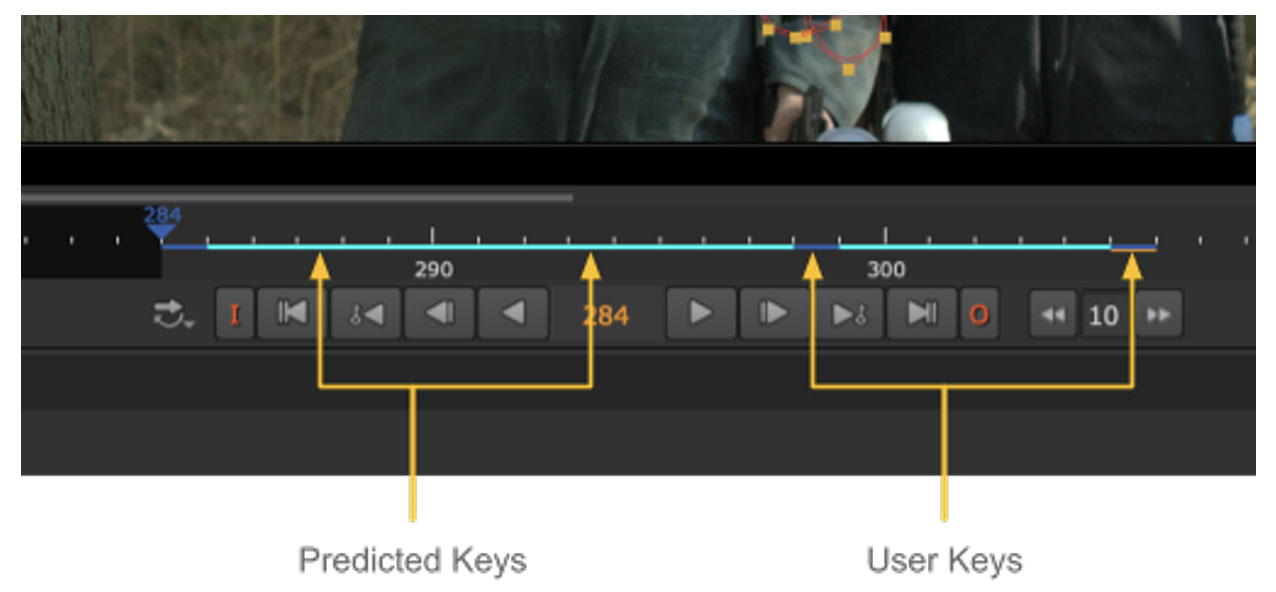
User keys vs predicted smart keys
It is worth digging a little deeper into this two-tier keyframe system, because it is the heart of how SmartRoto stays on the artist’s side. At one point in development, the user keys were called ‘gold keys’ as they are the real anchor points. The distinction is simple but powerful: user keys are treated as a source of truth and are used to guide the prediction of the smart keys. User keys will never be overwritten. And the granularity is per shape, not per frame — on any given frame it is possible to have a mixture of some shapes with user keys and some with smart keys, so you can lock down the shapes you are happy with while the model keeps refining the rest.
Foundry’s suggested workflow runs like this:
- Create roto shapes on the initial frame, choose a frame where your subject is fully in frame and unoccluded.
- Jump ahead and create a keyframe, choose a frame where there are significant changes to the subject. Select a group of shapes and create a smart key using the roto current frame button.
- Review and adjust: make sure the created smart key properly aligns with the subject, tweaking the shape or hitting the Convert Current Smart Key button to lock it in.
- Repeat: depending on the complexity of the shot, you may need to create a few keyframes to help guide the model.
- Set the working range: configure the working range in the properties, whether input, custom or in/out points. This sets the bounds when SmartRoto runs across the sequence.
- SmartRoto the sequence: the Create Smart Keys controls track the shapes across the working range.
- Review and adjust: if there are frames SmartRoto hasn’t got quite right, make adjustments to those frames, creating new user keys to guide SmartRoto, and repeat the process.
- Iterate to perfection.
If that reads like a description of how a good roto artist already works, establish the extremes, refine the in-betweens, lock …what’s right, – that is exactly the point.
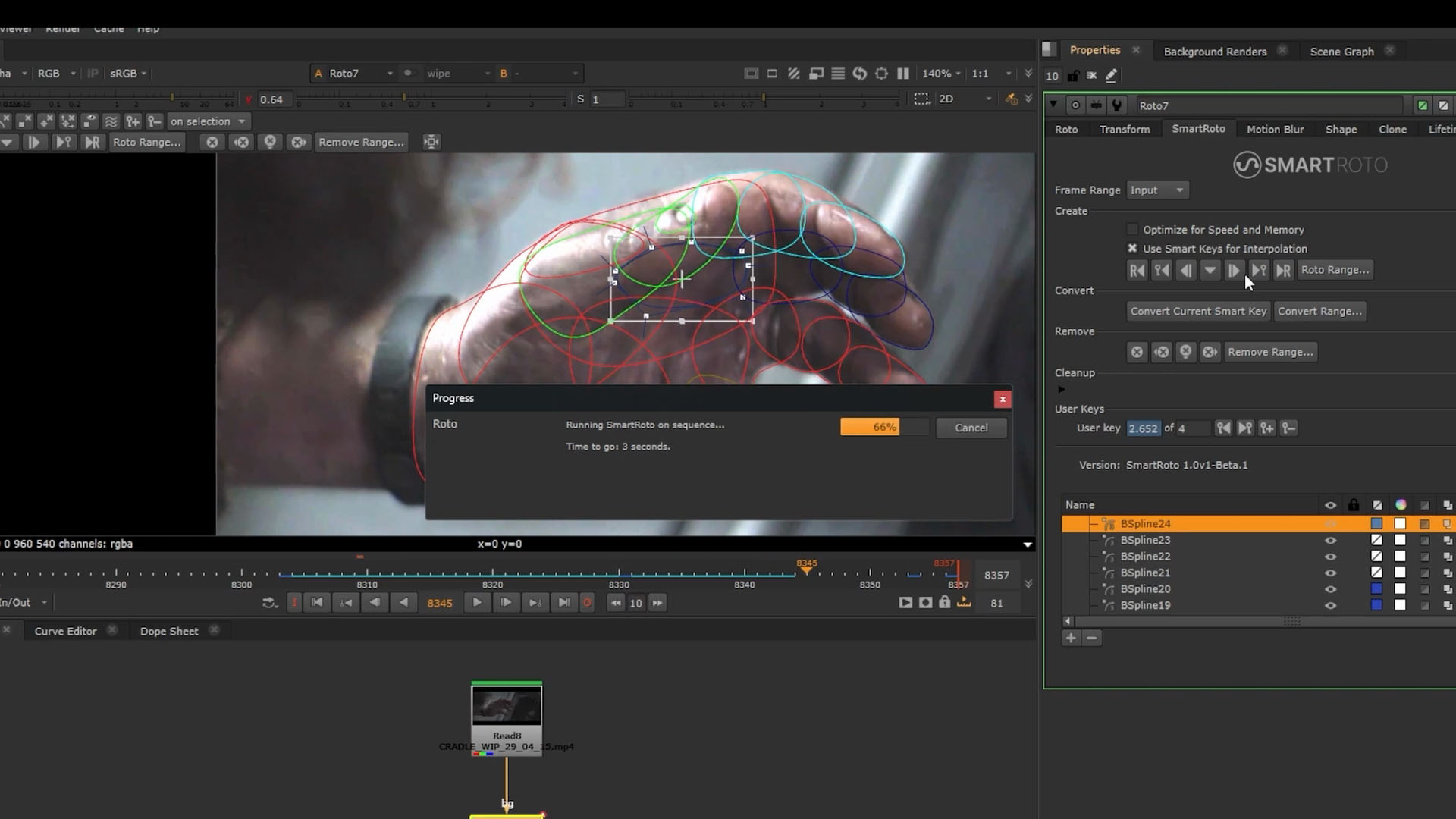
Not optical flow, not segmentation
We asked how the system works in principle. Cherbetji was clear it is neither of the two obvious candidates. “Not optical flow, that’s been tried. It was the first thing we attempted. Optical flow breaks down at the edge. That’s exactly where you need the precision.” Nor is it image-based matting. “A lot of the solutions we’ve seen in the market so far are using a segmentation model and drawing a spline around that. We don’t think that’s fit for purpose either.”
Instead, the machine learning model latches onto image features and propagates the splines themselves. This matters because splines remain the currency of roto, and they are subpixel-accurate. If one was to constrain them to what is merely easily visible in a matte, you’d throw precision away.
One of the cleverer aspects is that the model uses the relationships between shapes as a constraint. Breaking your subject down properly is not just good practice for articulation and clean edges; the spatial relationship between shapes actively gives the model more information about where things should be. This is also why drawing one big spline around the outside of a subject will not work well, but then, as any working roto artist knows, that has never worked. The tool leans into how experienced artists already operate rather than trying to replace their judgement.
The model has been trained on frames with motion blur and holds on surprisingly well, though heavily blurred frames may need more manual keys. The system tends to place edges at the middle of the blur. Because everything remains spline-based, you can render motion blur into your resulting mattes as normal. Partial occlusion is handled, but full occlusion still calls for the usual workflow of setting shape lifetimes. And if you have two identical-looking characters, “two stormtroopers, say, there is a chance the model mixes them up, but distinct image features keep it robust”, Cherbetji comments.
Four years in the making (or more)
SmartRoto has a longer history than the launch suggests. Foundry explored the problem with academic partners six or seven years ago without cracking it, ( w/ DNEG and the University of Bath : link), then the company restarted internally about four years ago, building a novel model and training datasets from scratch within its research team. The training footage comes from the director of research’s own filmmaking and is annotated with high-quality roto performed both internally and externally. The model is trained exclusively on licensed data and is fully commercially safe. Everything runs locally, and so no data is transmitted to the cloud.
Nor is it a heavyweight model. Depending on resolution and the number of shapes being tracked, you need around 8 gigabytes of VRAM; of course, more if you push to high resolutions with many simultaneous shapes, but nothing like the requirements of the big foundation segmentation models.
For final testing, Foundry brought a group of professional roto artists into the office for two weeks and measured them on a range of shots using plain vanilla Nuke versus SmartRoto, with the tool order randomised. By the end of the second week, artists were up to 4 times faster. Cherbetji was careful not to oversell that figure for production estimating: “I think that was probably on the higher end of what you can expect, but consistently twice as fast to do the same shot, and often much more.” The more telling result may be the qualitative one, artists reporting they never wanted to roto without it again!
Benjamin Bratt, compositor and author of Rotoscoping: Techniques and Tools for the Aspiring Artist, was part of the beta group: “I’m shocked at how good SmartRoto is. It uses principles of rotoscoping and incorporates an intuitive, easily adaptable key frame approach that meshes with manual roto practices. It’s easy to fix auto-generated keys without needing to start from scratch.”
A problem everyone wants to solve
Foundry is far from alone in chasing this. On paper, roto looks like an ideal problem for AI, repetitive, well-defined, with decades of ground truth sitting in studio archives, yet it has proven extremely hard to actually pull off. The difficulty is …well… the edge. Precision at the silhouette, temporal coherence across the sequence, and output an artist can actually edit. Of these three requirements, most automated approaches satisfy one or two, but rarely all three.
Sam Hodge at Kognat, who has been working on AI-assisted roto for years, has shown early, very promising results in this space. And the SIGGRAPH research community is circling the same territory: the RotoShop paper from Sirak Ghebremusse at OTOY (SIGGRAPH 2026) tackles the raster-to-vector side of the problem. RotoShop takes segmentation masks from a model like SAMv2 and, rather than handing the artist an uneditable matte, fits a pose-rigged set of canonical Bézier splines to the silhouette using a differentiable vector rasterizer, optimising control point offsets so the rendered splines match the mask, keying on fours and interpolating between. The stated aim is dataset creation, 100,000 frames of animated splines in 30MB versus 15GB of raster masks, but the underlying ambition is the same: production-quality roto that lives in splines, not pixels.
It is an interesting contrast in approach. RotoShop works backwards from segmentation, fitting vectors to raster masks; SmartRoto skips the matte entirely and propagates the artist’s own splines directly from image features. Different routes, but the same shared goal for VFX work. In all cases, the spline is the deliverable, and any AI roto solution that does not end in editable, subpixel-accurate splines and just produces mattes is really not solving the problem the way compositor actually need: ie. editable and high-fidelity.
With how expensive Maintenance is you’re charging $500 extra for this? That’s absurd.
This should be included.